🔥 Hot topic: Prices for your work 🔥

One thing I’ve been thinking about with the “you’re not charging enough” conversation is how contractors actually know when a price is enough. Raising prices is one thing, but if you don’t know the fully loaded cost behind the job, it’s still possible to raise the price and have less margin than you think. And a quote that looks fine initially can change pretty quickly when materials run over, labour takes longer, or the customer asks for a discount.

I’ve been testing a simple free calculator around this — you enter the job costs and target margin, then stress-test the quote against things like discounts and cost overruns. Full disclosure: I’m involved in testing it. There’s no signup or payment. I’m mainly trying to see whether contractors actually find this useful before taking it any further.

Upvote 0

Pro tip: take a photo when you clock in

Next time you clock in on a project, snap a photo while you're at it.

It gets tagged with "clock in," stamped with the date and time, and dropped right onto your timesheet next to your hours. So instead of a row of numbers, you've got a visual record of the job. A few ways crews are already using it: a shot of the truck in the driveway to start the day, a quick crew photo when everyone shows up, or a photo of the finished area to clock out.

Takes one extra second and turns your timesheet into proof of the work.

You have early access to Time Tracking, no cost to you while we fine-tune things. We'll give you a heads-up before pricing kicks in.

How are you using the clock-in photo on your jobs? Drop a screenshot or tell us your routine below.
Timesheets GIF by obii.io

FEATURE REQUEST: Add regular collaborators so they can be added to several projects instead of only to one

Hey Maria!

Thanks for this one, it's a great call out. Right now, Collaborators are tied to individual projects, so there's no way to save a group of people and pull them into a new project without sending a fresh invite each time. If you're working with the same subs over and over, I can see how re-inviting them on every Project gets old.

We don't have a saved Collaborator list like you're describing just yet, but it's exactly the kind of thing our product team wants to see, so I've passed your request along to them.

Requests like this one genuinely help the team figure out what to build next, so thanks for taking the time to write it up. Keep 'em coming!
  • Like
Reactions: Maria Erazo
Upvote 1

Invoices - Item Quantities

I love the Invoice feature already. Here's my #1 request, though. Item quantities should allow decimal values, and allow less than one. Labor is the #1 line item we'd need it for, but for us as electricians, we'll bill partials for pulling lube, silicone, phase tape, etc.
Hey, Decimals are supported on mobile so if you need to send an invoice with decimals please use mobile. We will update web today to support decimals. Thank you for flagging this!
Upvote 0

Photo Editing While In Proposals

Hi there,

Thanks so much for taking the time to share this! That's a really valid pain point, and we completely understand why jumping back and forth between the project and Proposals to edit a photo feels tedious, especially when you're trying to get something out to a client quickly.

I've passed this along to our product team. While I don't have a timeline to share right now, feedback like yours is exactly what helps shape what we build next, so it's genuinely helpful to hear how this fits into your workflow.

If anything changes on this front, we'll be sure to update this thread. Thanks again for flagging it!
Upvote 0

Price Book - Options - Being able to hide your price book is important to business owners

Hi there. I'm the product manager who is working on the price book and quick follow-up question for you. Are you wanting to hide the price book items for standard and restricted users who are creating proposals, or do you want to hide pricing from standard and restricted users who do not need to create proposals or have access to proposals?
Upvote 0

Feature Request: Horizontal Navigation for Project Boards on Desktop

Hey there, thanks so much for the thoughtful feedback! We're thrilled to hear you're excited about using Boards as your Project pipeline! 🎉

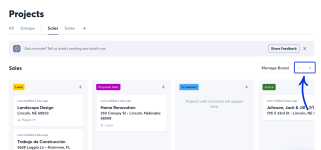
Good news: you don't need to touch your browser zoom at all. On the web app, you can navigate horizontally between columns using the arrow buttons in the top right of the Board view. Just click through them to move across your Board stage by stage, no matter how many columns you've got set up. I'm sharing an attachment showing where those arrows are located.

That should get you back to viewing everything at a comfortable, readable size while still having full visibility into every stage of your pipeline.

That said, your feedback about comparing the desktop experience to the Android app genuinely helps shape where we take the feature next. So thank you for taking the time to lay it out so clearly.

Let us know how that's working for you. We're always excited to see how teams are putting Boards to use!

Attachments

  • Screenshot Project Board horizontal arrows.png
    Screenshot Project Board horizontal arrows.png
    148.1 KB · Views: 1
Upvote 0

Feature Request: Folders or Collections in the Documents View

This is great to hear, thanks for circling back and letting me know it worked!

You're right about bulk actions. Setting up folders on a project that already has a pile of Files in it means a lot of clicking. I've passed that along to our product team, along with the tagging idea.

No timeline I can promise you, but this kind of feedback is exactly what shapes where Documents goes next. Keep it coming!
Upvote 0

Feature Request: CompanyCam Timesheet Sync with Jobber

Feature Request: CompanyCam Timesheet Sync with Jobber​

I’m using the new CompanyCam Timesheets beta and would like to see time entries included in the existing Jobber integration.

My projects are already connected between CompanyCam and Jobber. Ideally, when a crew member records time against a CompanyCam project, that time could sync to the corresponding Jobber job, including:

  • Employee/crew member
  • Date
  • Hours/start and stop times
  • Project/job
  • Notes, where applicable
Even a simple Export/Send to Jobber option would be useful if a full two-way sync isn't practical.

Currently I can manage this by filtering CompanyCam timesheets by project and crew, exporting the information, and then entering it into the appropriate Jobber jobs. However, that's time-consuming duplication of information that has already been captured digitally.

My goal is to have the crew enter their time once, at the project in CompanyCam, and have that information flow into the corresponding Jobber job for job costing, billing and payroll workflows.

Reducing duplicate entry is particularly important for a small contractor where the person managing the projects is also doing much of the field work.

Feature Request: Selective Client Access to Project Documents, Reports & Pages

Feature Request: Selective Client Access to Project Documents, Reports & Pages​

I would love to see Guest Access expanded into more of a client-facing project hub, while keeping the contractor in control of exactly what the client can see.

Currently, Guest Access is largely limited to the project photo feed. Reports and Pages can be shared individually by link, but that creates an ongoing administrative task for the contractor and can overwhelm clients with separate emails or links.

My ideal workflow would be very simple:

From the Documents area, allow me to select an individual Report, Page, File, permit, drawing, etc. and mark it “Visible to Guest” or “Share with Client.”

That item would then automatically appear in the client's existing Guest Access view.

For example, I might choose to expose:

  • Weekly or daily project reports
  • Permits and inspection documents
  • Drawings or specifications
  • Client approvals
  • Progress summaries
  • Selected project Pages
  • Other project documentation relevant to the client
Everything else — internal notes, timesheets, crew information, internal reports, costing information, etc. — would remain private by default.

The important distinction for me is that I don't want to manually send every report to the client. I want to publish selected information to their project view, allowing the client to return to one link whenever they want to see the current state of their project.

This would make CompanyCam much more useful as the central project communication record rather than requiring contractors to maintain a separate client portal or repeatedly distribute documents through email.

A simple “Visible to Guest” toggle or right-click Share with Client option on individual items in the Documents tab could potentially accomplish this without changing the underlying project structure.

How are you guys actually getting more reviews?

Going to start the 14-day trial & give it a run! I know this is just for Google Reviews - any plans for something similar for social media???

Sidenote, if there was a way to get this as an add-on instead of upgrading to Elite, we'll be more likely to purchase it. We don't have the need for any of the other Elite features...
Hey everyone! I just wanted to chime back in on this thread. Good news: CompanyCam has released Marketing Suite, which lets you post directly to social media, manage and respond to Google Business reviews, and showcase your best Project photos, all from inside CompanyCam.

Marketing Suite is an add-on that can be included with your existing plan. If you haven't tried it yet, you can start a free 14-day trial right from the web app (Marketing Suite is currently web-only, not in the mobile app). Just log in, click Marketing Suite in the left sidebar, and hit Start Free Trial. You can connect your Google Business Profile and social accounts during setup, or skip that and do it later.

More details here: https://companycam.com/marketing-suite

And here are our Marketing Suite how-to guides, in case you get stuck!
  • Love
Reactions: Shayla C.
Upvote 0

Hey there, CompanyCam Community!

Hi everyone! 👋

I'm Megan, a Support Specialist here at CompanyCam, and I wanted to pop in and introduce myself since some of our Support Team is going to be spending more time here in the community forums going forward!

We know you're the ones actually out in the field, on job sites, and using CompanyCam every day and we want to hear more from you. Specifically, we're hoping you can use this space to share how you're making CompanyCam work for your unique needs, share your feature requests with us, and spark conversations with your peers to share tips and real-world examples so everyone can learn from each other!

So consider this an open invitation to tell us about a clever way you're using a feature, ask a question you've been sitting on, or jump into a discussion with a fellow user. We'll be here, reading, responding, and looking for ways to bring your feedback back to our product team.

Excited to get to know this community better!

Hey CompanyCam Community!

Hey everyone, I'm Shayla!

I'm a Support Manager here at CompanyCam, and I wanted to introduce myself since I'll be spending more time here in the community. I've been in customer support and leadership for a while now, but the part I love most is hearing directly from you, our customers who use this tool every single day.

Your feedback, the good, the frustrating, and everything in between, is what actually shapes how we build and improve CompanyCam. So consider me an open ear. Drop your thoughts, your workarounds, your wishlist items, whatever's on your mind. I'm here for it.

To kick things off: what's one feature in CompanyCam that saves you the most time on the job? I'd love to hear it, and if there's something that's driving you nuts, I want to hear that too.

Looking forward to getting to know this community!

UPLOADING VIDEOS AND IMAGES

Hey there, Robert! Megan here with CompanyCam Support and I'd be happy to help you out with this.

We wouldn't want you to lose your pending photos, so please make sure not to uninstall/reinstall the app before saving or uploading these photos.

Typically, the following troubleshooting steps will solve the issue you're seeing. First, ensure you have a strong network connection, then go ahead and give them a try:
  1. Try turning your device's Airplane Mode off and on a few times - give a moment each time you turn the mode on and off.
  2. On the home screen in the mobile app, to ensure your photos are saved to your device - tap View > 3 Dot Button in the top right corner > Save All.
  3. Then do the same process and select Retry All and keep the app open and front-facing while photos upload.
  4. If that doesn't work, please log out and log back into the app.
  5. If that doesn't work, please hard close the app and restart.
  6. If that doesn't work, restart your mobile device.
  7. Once you are sure that all of the photos are saved to your device, delete the app and reinstall. **If you have photos that are waiting to be uploaded, they will be lost as they haven't had a chance to sync to the cloud yet.**
Something else to keep in mind is that if the User experiencing this was switched to a Restricted permission role before the photos could be uploaded, they would be unassigned from the Project, which would halt the upload. In this case, we'd recommend switching the User to a Standard permission role and attempting to Retry All again.

If you've tried all these and you're still having trouble uploading your photos, we'd recommend reaching out to our Support team for more immediate and specific help.

Please let us know if you have other questions!

CompanyCam API: list photos, including tags in the response

I’m using the API to list photos on a project:

https://companycam.readme.io/reference/listprojectphotos

I need to retrieve the tags associated with each photo, but the response from this endpoint does not appear to include tag data.

Right now, it looks like getting tags requires a separate request for each individual photo:
GET /v2/photos/{photo_id}/tags

This does not scale well for real projects. Many projects have hundreds of photos, and each photo may have multiple tags. To build a complete project photo/tag view, an integration may need to make hundreds of additional API requests just to retrieve tag data.

That creates performance issues, increases the likelihood of hitting rate limits, and makes tags difficult to use reliably in external integrations.

The Project Photos API already supports filtering by tag IDs, which suggests the tag data is most likely readily available server-side when querying project photos, it's just being discarded rather than included in the response. It would be very nice if the list photos API at least had the option to include tag data in the response, even if it's turned off by default.


Thanks for your help.
Thanks for passing this along! I got this to the team so they have the feedback in hand!
Upvote 0

Project Showcases + SEO

Hi All.

Who else here is using the CompanyCam Project Showcases feature?
  • Any tips on utilizing this feature and also increasing SEO? It seems that separate, localized webpages increase SEO? tips from CompanyCam reps and also users welcomed!
  • How is it getting up to speed with your projects? Do you have a goal for total number of showcases?
I am thrilled with how it has turned out on our website. We inserted a disclaimer that what is published on our website is not a comprehensive list of all projects - this allowed me the peace of mind to get going knowing that it won't ever be perfect but slowly adding showcases will only help us.

Attachments

  • Sunrise 805 showcase.jpg
    Sunrise 805 showcase.jpg
    302.7 KB · Views: 2

👋 Start Here: Introduce Yourself + Get to Know the Community

  • Name or nickname: Corey Nichols - co-owner of Southwest Pools
  • Trade(s): GC
  • Where you’re based: North Texas
  • What kind of work you do: New Inground Gunite Pool Construction, Outdoor Living, Pool Renovations
  • Biggest win lately: My biggest win lately is that I successfully built an app that my technicians can use in the field to record chemical readings with dosage recommendations, with all of the information syncing automatically to our CRM Job Nimbus
  • What brought you here / what you’re hoping to get out of this community: I was just looking for training videos on features I have never used before
Welcome Corey!
  • Like
Reactions: SWPools
Upvote 0

Filter