Feature Request: Horizontal Navigation for Project Boards on Desktop
I've just started setting up Project Boards and really like the potential of using a Board as an overall project pipeline.
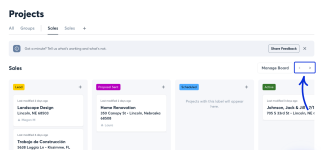
One issue I've run into on the desktop/web version is navigation when a Board has more columns than will fit on screen. At 100% browser zoom, I can only see the first few columns of my pipeline and I haven't found a way to scroll or navigate horizontally to the remaining columns.
I can work around it by reducing my browser zoom to about 50%, which lets me see the whole Board, but everything becomes understandably quite small.
Interestingly, the Android app handles this nicely: it displays one Board column per page and allows horizontal navigation through the columns.
It would be great to have a similar navigation option on desktop — a horizontal scrollbar, trackpad/mouse horizontal scrolling, or another way to move through the columns without changing browser zoom.
For contractors using Boards as a full project pipeline, having 10+ stages isn't unusual, so this would make the desktop Board considerably more useful.
Really liking Boards otherwise and looking forward to putting this workflow into use.
I've just started setting up Project Boards and really like the potential of using a Board as an overall project pipeline.
One issue I've run into on the desktop/web version is navigation when a Board has more columns than will fit on screen. At 100% browser zoom, I can only see the first few columns of my pipeline and I haven't found a way to scroll or navigate horizontally to the remaining columns.
I can work around it by reducing my browser zoom to about 50%, which lets me see the whole Board, but everything becomes understandably quite small.
Interestingly, the Android app handles this nicely: it displays one Board column per page and allows horizontal navigation through the columns.
It would be great to have a similar navigation option on desktop — a horizontal scrollbar, trackpad/mouse horizontal scrolling, or another way to move through the columns without changing browser zoom.
For contractors using Boards as a full project pipeline, having 10+ stages isn't unusual, so this would make the desktop Board considerably more useful.
Really liking Boards otherwise and looking forward to putting this workflow into use.