• Question Question
Picture Organization

Is there any chance in the future we will be able to reorganize or move pictures around within the project screen rather than moving them around after creating the report? Sometimes I take the pictures out of order and moving them around after creating the photo report is not easy especially when I have only two photos per page so I have to hold the image down and move it down or up very slowly. Thanks!

Job Customer / Client / Contacts

We are a subcontractor that works for restoration firms who have clients. Our customers are the restoration firms and pm - they pay the bills. Not the home owner.

So in CC, the project is the job, the customer is the restoration firm but we lose track of the job contact (typically the home owner). We also can't easily keep track of the job number and purchase orders for the job and other administrivia. I'm currently putting that info into the description, but there's gotta be a better cleaner way

It would be great if the job info had that contact info like: Client name, email, phone, and generic notes
The job could have: Job number, purchase order.
The Customer field works for us as is.
  • Like
Reactions: Megan M.

Price Book Categories

Having categories for the price book would be wonderful. I work with a window installation and remodeling company. It would be nice to have categories, since price lists can be thousands of items. Having a category for bathrooms, accessories, trim, etc. We are migrating from SalesPro, and their price guide setup was quite nice, with categories, sub-categories, and drill-down options.
  • Like
Reactions: Megan M.

Adding a easy to see video button on all projects

Hi,

I would like to ask if there is a way you can add an easy to see video button on each project so we know which projects have videos attached to them vs having someone manually create and remember to select a label and then search that way. I attached a photo of where im thinking it would be helpful to have the button. Pretty much as you look at all projects to the right of all customers you see an area that says photos, checklist, documents and files adding one there that shows us how many videos and what project has videos would be SUPER helpful.

Attachments

  • Screenshot 2026-09-28 at 8.27.45 AM.png
    Screenshot 2026-09-28 at 8.27.45 AM.png
    30.2 KB · Views: 2
  • Like
Reactions: Megan M.

Bring back the previous reports function

I just logged on to type up a new report and found the Create Report button was gone. Long story short, the ai chat told me that the only way to create a report now is to create a document using the native document feature. You are able to select a "Report Layout", however it's much clunkier and not as polished as the previous dedicated report function. I also would never use the native Company Cam document builder as it is nowhere near as useful as word or even docs. I feel like removing the dedicated report builder was a major step backwards. It was a primary reason I chose company cam over some of the bigger CRM software's like service titan and housecall pro. Having the ability to filter through my report photos by simply clicking add photo and not having to worry about accidentally moving the photo insert box in the document was really nice. Maybe I'm being too picky but I liked not having to worry about font, spacing, or anything besides typing my report, selecting my photos, and clicking generate pdf.
  • Like
Reactions: Megan M.

Email forward for storage and easy retrieval

The conversation focused on whether CompanyCam could support a feature that automatically receives and stores emails inside the platform.
The user proposed a workflow where:
  • Each project would have a unique email address
  • Emails sent to that address would automatically appear in the project
  • Messages would be stored in a read-only folder for easy viewing
This would eliminate the need to manually download or upload emails and keep all project communication organized in one place.
Currently, CompanyCam does not support receiving or storing emails directly.
The suggested alternative is to keep project communication inside the Conversations Hub, where teams can reply to messages and attach photos or files within the project thread.
The user also suggested this as a potential product feature to streamline email management across projects.
  • Like
Reactions: Megan M.

Project Access from My Stuff

When I assign tasks to a normal user, when they pull up that task from My Stuff -> Tasks, they are able to get to the job to view the whole thing when they are using an iPad. However, on the phone app, they are only able to view the task and not the associated job. Can this be fixed so that we can pull up the job from the task view?

Attachments

  • IMG_2121.PNG
    IMG_2121.PNG
    118.1 KB · Views: 1
  • Like
Reactions: Megan M.

Global Document View of Signature Request/Status

We would like Documents Sent for Signature to be accessible directly from the left-hand toolbar. This would give our team one place to quickly view and track outstanding documents without having to navigate through individual projects.

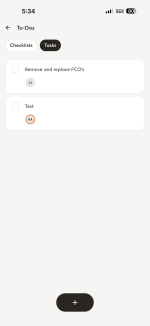
We also like the new Home layout and would love to see the To-Do section become customizable based on how each company operates.

We do not use To-Dos within the platform because we manage all of our tasks through AccuLynx. Because of this, the To-Do section is essentially wasted space on our Home page. Giving companies the ability to customize this section would make the Home dashboard much more useful.

For our company, we would replace the To-Do section with Documents Sent for Signature.

Ideally, this section would give us a quick snapshot of documents and their current status:

• Awaiting Signature
• Signed

Having Documents Sent for Signature available both on the Home dashboard and from the left-hand toolbar would make it much easier for our team to monitor documents that still need attention.
  • Like
Reactions: Megan M.

Wishlist Request: QuickBooks Projects → CompanyCam Projects

We use QuickBooks Online’s actual Projects feature to separate individual jobs underneath a parent customer. This allows project/job cost tracking easily


For example:


Customer: TeleData
QuickBooks Project: TD-2026-B-078636 (Monticello)


I would love the option for creation of a new QuickBooks Project to automatically create the matching CompanyCam Project.


Ideally, this would be a selectable sync rule so that:


New Customer → does NOT automatically create a CompanyCam Project
New Estimate → does NOT automatically create a CompanyCam Project
New Invoice → does NOT automatically create a CompanyCam Project
New QuickBooks Project → DOES automatically create a CompanyCam Project


For companies like ours, the parent customer may have dozens of individual jobs, so the QuickBooks Project is the point where a customer relationship becomes an actual field project that needs photos, checklists, documentation, and crew activity in CompanyCam.


This would make the integration much cleaner and prevent unnecessary CompanyCam projects from being created simply because a customer, estimate, or invoice was entered in QuickBooks.


Bonus points if the CompanyCam project could inherit the QuickBooks Project name, parent customer, address, project number/ID, and assigned contact information automatically.

White‑label proposal email branding

Right now, when we send proposals from CompanyCam, the email that goes to customers still shows CompanyCam branding and the CompanyCam logo. This makes it difficult to present proposals as fully coming from our own company.
We’d like the ability to fully white‑label the proposal email so it reflects our company branding instead of CompanyCam. This would make proposals feel more professional and consistent with our brand when customers receive them.
This is currently preventing us from using proposals the way we’d like in our workflow.
  • Like
Reactions: Megan M.

Field Scheduling

The biggest gap here is field scheduling. I have been with company cam forever and patiently waiting for a basic schedule to come out so the guys know where to go and when to go.

It's the biggest gap I have. As a renovations company I need a software like jobtread to schedule and budget projects, but their field use side is super weak, So I use company cam to manage all of my field staff, which works amazing, but I still have to formally send a "this is where you are going today" text to everyone. A simple calendar where you could asign the tasks or checklists to and assign the crew to would be super helpful, or even simpler, just a calendar where you can sign the crew to a date and a time and a project.
  • Like
Reactions: Megan M.

Allow Timelink Link to download original and modified photos

We do lots of surveys for our clients where the designers would like access to the original photos and the marked up ones with measurements, etc. Right now, the Timelink link only allows for downloading the "modified" photo. I would like to have the ability to download original photos also. The workaround is that I have to download "originals" and send them to my client. These projects progress over months, sometimes years, so I am often downloading "originals" for my clients as they need them.
  • Like
Reactions: Megan M.

Filter