Hi,
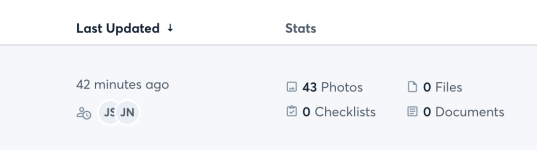
I would like to ask if there is a way you can add an easy to see video button on each project so we know which projects have videos attached to them vs having someone manually create and remember to select a label and then search that way. I attached a photo of where im thinking it would be helpful to have the button. Pretty much as you look at all projects to the right of all customers you see an area that says photos, checklist, documents and files adding one there that shows us how many videos and what project has videos would be SUPER helpful.
I would like to ask if there is a way you can add an easy to see video button on each project so we know which projects have videos attached to them vs having someone manually create and remember to select a label and then search that way. I attached a photo of where im thinking it would be helpful to have the button. Pretty much as you look at all projects to the right of all customers you see an area that says photos, checklist, documents and files adding one there that shows us how many videos and what project has videos would be SUPER helpful.