Customer Sync and Project Creation

catalystelectric

CoCam Community Legend
Oct 7, 2025
7
2
A couple of suggestions:

1) Allow back-syncing to Quickbooks online when creating Customers and Projects. So, any customer created in CompanyCam's database creates in Quickbooks Online, and projects are created as Projects to that customer as well.
2) When creating a new project, have a dropdown to select the customer it's assigned to, and then auto-populate the contact info after it's created.
 
Hey there!

Thanks for the feedback.

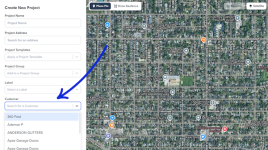
Are you using the CompanyCam Customer feature? If so, you can choose a Customer from the drop-down in the Project creation flow. I've included a screenshot below of what that looks like.

Untitled design (45).png

Customers are great for keeping every job tied to the right contact info without re-entering it project after project, and they work with our other sales features such as Boards, so you can see exactly where each customer's project sits in your pipeline. Read more here: https://help.companycam.com/en/articles/15327299-creating-and-managing-customers

As for your request regarding the QuickBooks Online integration: right now, new Customers, Sub-Customers, Estimates, and Invoices created in QuickBooks Online automatically create a matching Project in CompanyCam, and you can send photos from that Project back to QuickBooks Online, plus payments collected in CompanyCam sync over automatically. But creating a Customer or Project in CompanyCam first and having that push a new Customer record into QuickBooks Online isn't something we support today. I'll pass this along to our product team as a feature request.

Thanks again!
 
Upvote 0
Thanks for letting me know!

I dug into this a bit and noticed your account was manually opted out. We've re-enabled the feature on your account. Let me know if you're seeing that after a quick refresh and/or logging out and back in. 🙂
 
Upvote 0