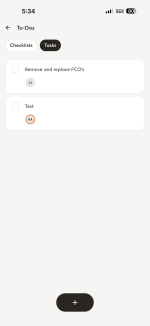
Hey there! I think I can explain what you're seeing, because it's probably not an iPad-vs-phone thing at all. It's more likely the two devices are on different app versions.
We recently changed how tapping a task from
My Stuff behaves with app version 10.0.52. It used to drop you straight onto the Project. Now it takes you to that task inside the job's
To-Dos list, so you land right on the thing you were assigned instead of having to go hunting for it. Useful in a lot of cases, but as you've found, it also means you're no longer getting dropped into the full job.
So if your iPad is running an older build and the phones
have updated, you'd see exactly the split you're describing. Would you mind checking the version on both? (Tap your
User Icon the top left →
Settings Gear Icon → scroll to the bottom.) If the numbers are different, that'd confirm it.
In the meantime, a couple of things that should help your crew get into the full job faster:
Star the active jobs. Starred projects sit right on the home screen under Projects. One tap from home, no searching.
Lean on Nearby. If they're on site, the job should surface under
Nearby on the home screen. Usually the quickest route in.
And honestly, your point stands regardless of the version question: if someone's looking at a task, getting to the rest of that job shouldn't take a detour. I'm passing this straight to the team that works on Tasks. Thanks for taking the time to write this up.