Assign Project Manager/Team - Dedicated Email Activity for Assigned Projects

Hi CompanyCam Team,

I’d love a feature that allows us to assign a Project Manager/Team to a specific project, and then have that assignment automatically control project-specific activity emails.

What I’m looking for:

  • Ability to assign a Project Manager/Team (or main owner) to each project.
  • Once assigned, that person receives email notifications when there is new activity on that project, including:
    • New photos added
    • Checklist activity (items completed or updated)
    • Reports created or updated
    • Pages activity
    • Documents uploaded or modified

Each email could include:
  • A brief synopsis of what changed
  • A link directly to the new activity in CompanyCam

This would help us ensure the right person is always in the loop for their projects without having to manually watch everything or dig through notifications.

Thanks for considering this, it would really streamline our project oversight and communication!

How have you implemented AI into your business?

In our recent CompanyCam classes, we've been asking users for their opinions on AI and how they're approaching it in their business.

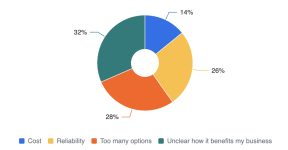
Nearly 1 in 3 respondents told us that their biggest barrier to implementing AI is that it's "unclear how it benefits my business."

So I'm curious to see what the Community's experience with AI is:
  1. Have you implemented AI into your business? Why or why not?
  2. What benefits have you experienced? If any.
  3. What tools/apps have you tried?

Attachments

  • screenshot_2025-11-17_at_12.21.21___pm.png
    screenshot_2025-11-17_at_12.21.21___pm.png
    42.4 KB · Views: 2
  • Wow
Reactions: janel.delgado

Your WILDEST story is ...

What is the craziest story that has happened to you on a job site, since running a business, dealing with a customer or just being in the contracting/construction space?

We're going to keep this thread open and moving forward and we may rank the best ones on an episode of the Good Contractor Podcast or possibly have a few folks on to tell the story on an episode.

Fire away!
  • Like
Reactions: janel.delgado

Paid Time Off

As most of my questions, I’m always interested to hear on how others operate their companies. I started mine front eh ground up with zero business experience almost 11 years ago. So I’m always trying to learn new things and adapt to better or more efficient ways.

So here’s my next question. Paid time off. What do you do? Or are you strictly vacation pay? I am in Canada so things may be a bit different here. Pretty standard for the trades is a base 4% with stat holidays paid. Other companies will do 12% with no paid stats. Some companies do either or and give PTO as well?
  • Like
Reactions: ChristianA

How do you track your expenses?

Just wondering how everyone tracks your expenses and bookkeeping stuff. I just adapted over the years as I learned more about business ownership, but curious as to how other people do it. I’m always up for improving so thought this would be a great place to ask.

Me personally I log all pdfs into Goodle Drive based per month, per business, per account, with separating misc receipts from suppliers.

I also add the name of seller, the job name, expense total, invoice number and date so they’re easily searchable if needed.

All files are shared with my bookkeeper & accountant monthly.

💰Bonuses

Let talk about employee bonuses. How often do you give them if at all? How much don you give? What determines the amount and frequency?

I am now a very small company after heavily downsizing. I have given many frequent bonuses in the past but noticed that after sometime it was expected, even if drive, workmanship and work quality decreased (exponentially sometimes). I’m looking into better system rather than just “whenever” as I do want to be generous with profits, but also don’t want the same thing happening where I started feeling walked on afterwards…

Project filters

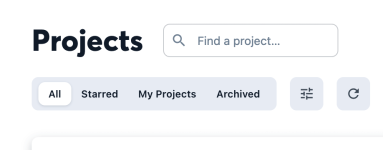
When I go to Projects, I have so many. It is mixed between potential jobs, signed jobs and then our cleanings. I wish there was a way to create a filtered tab in the grey box that we could name. Kind of like the tags do, but in it's own list. I hope that makes sense. I see I can filter the all bucket, but that is temporary. Thank you!

Attachments

  • Snip20251112_2.png
    Snip20251112_2.png
    35.5 KB · Views: 2

Is there a way to filter by pages completed?

Hey team!
Is there a way to filter by pages completed and by the person who completed them? The install team at our cabinet company wants to be able to do this to see who has filled out their daily logs at the end of every day.Screenshot 2025-11-05 at 12.37.04 PM.png
Or add it to the left menu, similar to the Checklist Feed

Screenshot 2025-11-05 at 12.46.59 PM.png

Attachments

  • Screenshot 2025-11-05 at 12.37.04 PM.png
    Screenshot 2025-11-05 at 12.37.04 PM.png
    101.3 KB · Views: 2

Irrigation Noir

BS024_Good-Contractor_S2_Working-With-Matt_Animated-Lightning480.gif
For most interviews in Season 2 of the Good Contractor Podcast we try to add a few animated illustrations to bring one of our guest's stories to life. Usually, I spend time brainstorming the visual direction for each animation - but when Matt began describing the mystery of irrigation, I knew almost instantly that it would be noir-themed.

Login to view embedded media
Shout-out to our incredible illustrator, Adam Kovar, for perfectly capturing the classic noir vibe while staying true to our three-tone sketch style.
Let me know if we nailed it - or if not, what genre you think would fit the irrigation story better.

🎉 Big Update: New Homepage for the CompanyCam Community!

Whoa, we have 150+ members already! You all are amazing!

We just flipped the switch on a fresh new homepage at community.companycam.com. Here's what's different:

What's New:
Instead of landing in The Blue Room, you'll now see a live feed of ALL the hottest discussions across every forum—all in one spot. Think of it as your community command center where nothing gets missed. You can also navigate to new areas like "New" or "Hot" or "Following" to see content generated by your fellow users based on what is new, what is driving the most discussion or who you are following.

1762181179940.png

Want the OG Blue Room experience?
No problem! You've got options:
- Bookmark the direct link: community.companycam.com/forums/the-blue-room.2
- Use the Forums menu to jump anywhere
- Hit "Forum List" at the top of the new feed

PLUS: Trade Forums Are HERE! 🔨
Starting today, we're rolling out dedicated spaces for every trade. Plumbers talking plumbing. Roofers talking roofing. You get it. Find your crew and dive in.

The new view makes it stupid-easy to catch what's trending across the entire community. No more FOMO on conversations happening in other forums.

Let us know what you think! Drop your feedback right here or hit me up directly (via message here or at john.talman@companycam.com)

New Hire Onboarding Checklist - Help Please

Hey CompanyCam and Company!

I don't think the thread title articulates what I am asking for all that well. If anyone could kindly point me in the right direction of a new hire checklist that is strictly CompanyCam oriented, that would be great. We are in process of expanding and with some minor turnover I feel like I spend a couple of hours each week going over how to do basic functions like entering a new project. How to edit a photo after taking it, how to choose a photo tag versus a project tag.

Nonetheless, any insight is appreciated, come one come all, I will not be disappointed to learn how others are teaching their most valuable assets to use their most valuable assets throughout the course of the work day.

Filter