Price Book - Options - Being able to hide your price book is important to business owners

Hi there. I'm the product manager who is working on the price book and quick follow-up question for you. Are you wanting to hide the price book items for standard and restricted users who are creating proposals, or do you want to hide pricing from standard and restricted users who do not need to create proposals or have access to proposals?
Upvote 0

Make Checklist Templates available to track on Groups > Overview > Checklist

Hi, Hailey!

I'm curious: are you and your team using Advanced Checklists instead of Classic Checklists? I ask because we're still actively developing this feature, and this functionality might not be available yet.

I've gone ahead and passed your feedback on to our team, who are improving Advanced Checklists. If you have anything else to share, please feel free to reply, and I'll pass it along!
Upvote 0

Make Checklist Templates available to track on Groups > Overview > Checklist

Hello,

I am a Project Manager using Company Cam and have a checklist template I need to complete for each audit. It would be really helpful to be able to see the progress of that checklist from the Group Overview page. However, as I can see now, checklist templates do not show up on that page. Is this something that can be integrated there? Thank you!
  • Like
Reactions: Megan M.

360 Camera Support

I'm honestly surprised this isn't already a feature.

The mobile app should have a toggle for taking photos with a handheld 360 camera that is bluetooth connected to the mobile device. I should be able to select my Insta360 camera as the source of photos. Then, the desktop website would need to add support for viewing/interacting with 360 photos.

Looking for solutions to doing jobsite walkthroughs with a 360 camera. We already subscribe to companycam and would love it if this was in the product offering. I don't want another subscription.

Another facet of this could be to add support for drawing sets. Going on a site walk?

1. Create new companycam project
2. Upload drawing set
3. Walk through job with 360 camera, taking photos and mapping them to the drawing set.
4. Review drawing set back at a computer and view the 360 photos, mapped to specific locations on the drawing set.

Real-estate agents do this, and I think companycam should as well.

Feature Request: Horizontal Navigation for Project Boards on Desktop

Hey there, thanks so much for the thoughtful feedback! We're thrilled to hear you're excited about using Boards as your Project pipeline! 🎉

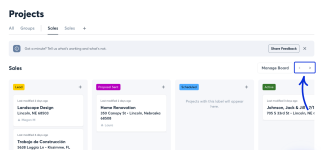
Good news: you don't need to touch your browser zoom at all. On the web app, you can navigate horizontally between columns using the arrow buttons in the top right of the Board view. Just click through them to move across your Board stage by stage, no matter how many columns you've got set up. I'm sharing an attachment showing where those arrows are located.

That should get you back to viewing everything at a comfortable, readable size while still having full visibility into every stage of your pipeline.

That said, your feedback about comparing the desktop experience to the Android app genuinely helps shape where we take the feature next. So thank you for taking the time to lay it out so clearly.

Let us know how that's working for you. We're always excited to see how teams are putting Boards to use!

Attachments

  • Screenshot Project Board horizontal arrows.png
    Screenshot Project Board horizontal arrows.png
    148.1 KB · Views: 1
Upvote 0

Feature Request: Horizontal Navigation for Project Boards on Desktop

Feature Request: Horizontal Navigation for Project Boards on Desktop

I've just started setting up Project Boards and really like the potential of using a Board as an overall project pipeline.

One issue I've run into on the desktop/web version is navigation when a Board has more columns than will fit on screen. At 100% browser zoom, I can only see the first few columns of my pipeline and I haven't found a way to scroll or navigate horizontally to the remaining columns.

I can work around it by reducing my browser zoom to about 50%, which lets me see the whole Board, but everything becomes understandably quite small.

Interestingly, the Android app handles this nicely: it displays one Board column per page and allows horizontal navigation through the columns.

It would be great to have a similar navigation option on desktop — a horizontal scrollbar, trackpad/mouse horizontal scrolling, or another way to move through the columns without changing browser zoom.

For contractors using Boards as a full project pipeline, having 10+ stages isn't unusual, so this would make the desktop Board considerably more useful.

Really liking Boards otherwise and looking forward to putting this workflow into use.

Feature Request: Folders or Collections in the Documents View

This is great to hear, thanks for circling back and letting me know it worked!

You're right about bulk actions. Setting up folders on a project that already has a pile of Files in it means a lot of clicking. I've passed that along to our product team, along with the tagging idea.

No timeline I can promise you, but this kind of feedback is exactly what shapes where Documents goes next. Keep it coming!
Upvote 0

Feature Request: Folders or Collections in the Documents View

Thanks Shayla — that was a very quick and helpful response. I gave the folders a try and they work exactly as I was hoping. It’s clean, intuitive, and makes the Documents area much more useful for field access.

The only improvement I noticed while setting it up is that documents currently need to be moved into folders one at a time. Since CompanyCam already has bulk select/edit, tagging, and moving for photos, it would be great to see that same functionality carried over to Documents — particularly bulk Move to Folder and tags.

Tags could also make document search and filtering even more useful alongside the folder structure.

Other than that, the folder implementation is super clean and efficient. Thanks again for pointing me in the right direction and for being so responsive to the feedback today!
  • Love
Reactions: Shayla C.
Upvote 0

Feature Request: Folders or Collections in the Documents View

Feature Request: Folders or Collections in the Documents View
I like the recent change combining Reports and Pages into the Documents area, and I also appreciate that Documents are searchable and can be filtered.

I would love to see an additional organizational layer added: folders, collections, or some similar way of grouping documents within a project.

As CompanyCam becomes a more complete project record, the Documents area can quickly contain very different types of information:

  • Daily Reports
  • Weekly Reports
  • Permits & Inspections
  • Site Plans
  • Drawings
  • Specifications
  • Project Notes
  • Client Documents
  • Other project-specific records
Search and filters are useful, particularly from an administrative perspective, but they don't completely replace simple visual organization.

My biggest concern is quick field access.

If one of my crew members needs the site plan, permit or latest drawing while standing on a job, I want them to be able to open the project, go to Documents → Drawings and immediately find it.

If finding a document requires searching, remembering its name, selecting the correct filter, or scrolling through a mixture of daily reports, notes, permits and drawings, field adoption becomes much more difficult.

A simple folder structure could make the Documents area much more useful as the project's working reference library.

For example:

Documents

  • Daily Reports
  • Weekly Reports
  • Permits & Inspections
  • Plans & Drawings
  • Specifications
  • Project Notes
I don't think this needs to replace the existing search and filtering tools — I think the two approaches complement each other.

Search and filters are excellent for finding something. Folders are excellent for knowing where something is.

For office use, either method works. In the field, reducing the number of taps and decisions required to reach an important document can make the difference between the crew actually using the project documentation and simply calling or texting someone to ask where it is.

As more project information moves into CompanyCam, having a simple organizational structure within Documents would help make it practical as both the project record and the crew's everyday field reference.
Hey there!

Loving all of the feedback and feature requests today. Keep 'em coming!

We built Folders alongside the Documents tab for exactly the reason you're describing. Search is great once you know what you're looking for, but your crew shouldn't have to think that hard to pull up a drawing.

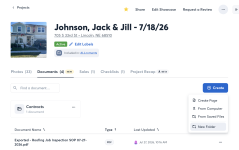
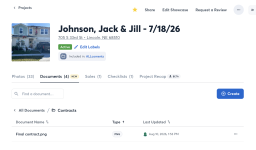
You can build out the structure you laid out above. Click +Create > New Folder to create Daily Reports, Permits & Inspections, Plans & Drawings, and so on. Then click the three-dot menu to the right of any Document and select Move to Folder.

Here's a step-by-step walkthrough: https://help.companycam.com/en/articles/16130532-organizing-documents-with-folders

Give it a shot and let me know if the structure holds up in the field. Genuinely curious how your crews take to it.

Attachments

  • Screenshot 2026-08-10 at 1.54.09 PM.png
    Screenshot 2026-08-10 at 1.54.09 PM.png
    393.5 KB · Views: 1
  • Screenshot 2026-08-10 at 1.54.20 PM.png
    Screenshot 2026-08-10 at 1.54.20 PM.png
    348.5 KB · Views: 1
Upvote 0

Feature Request: CompanyCam Timesheet Sync with Jobber

Feature Request: CompanyCam Timesheet Sync with Jobber​

I’m using the new CompanyCam Timesheets beta and would like to see time entries included in the existing Jobber integration.

My projects are already connected between CompanyCam and Jobber. Ideally, when a crew member records time against a CompanyCam project, that time could sync to the corresponding Jobber job, including:

  • Employee/crew member
  • Date
  • Hours/start and stop times
  • Project/job
  • Notes, where applicable
Even a simple Export/Send to Jobber option would be useful if a full two-way sync isn't practical.

Currently I can manage this by filtering CompanyCam timesheets by project and crew, exporting the information, and then entering it into the appropriate Jobber jobs. However, that's time-consuming duplication of information that has already been captured digitally.

My goal is to have the crew enter their time once, at the project in CompanyCam, and have that information flow into the corresponding Jobber job for job costing, billing and payroll workflows.

Reducing duplicate entry is particularly important for a small contractor where the person managing the projects is also doing much of the field work.

Feature Request: Folders or Collections in the Documents View

Feature Request: Folders or Collections in the Documents View
I like the recent change combining Reports and Pages into the Documents area, and I also appreciate that Documents are searchable and can be filtered.

I would love to see an additional organizational layer added: folders, collections, or some similar way of grouping documents within a project.

As CompanyCam becomes a more complete project record, the Documents area can quickly contain very different types of information:

  • Daily Reports
  • Weekly Reports
  • Permits & Inspections
  • Site Plans
  • Drawings
  • Specifications
  • Project Notes
  • Client Documents
  • Other project-specific records
Search and filters are useful, particularly from an administrative perspective, but they don't completely replace simple visual organization.

My biggest concern is quick field access.

If one of my crew members needs the site plan, permit or latest drawing while standing on a job, I want them to be able to open the project, go to Documents → Drawings and immediately find it.

If finding a document requires searching, remembering its name, selecting the correct filter, or scrolling through a mixture of daily reports, notes, permits and drawings, field adoption becomes much more difficult.

A simple folder structure could make the Documents area much more useful as the project's working reference library.

For example:

Documents

  • Daily Reports
  • Weekly Reports
  • Permits & Inspections
  • Plans & Drawings
  • Specifications
  • Project Notes
I don't think this needs to replace the existing search and filtering tools — I think the two approaches complement each other.

Search and filters are excellent for finding something. Folders are excellent for knowing where something is.

For office use, either method works. In the field, reducing the number of taps and decisions required to reach an important document can make the difference between the crew actually using the project documentation and simply calling or texting someone to ask where it is.

As more project information moves into CompanyCam, having a simple organizational structure within Documents would help make it practical as both the project record and the crew's everyday field reference.

Feature Request: Selective Client Access to Project Documents, Reports & Pages

Feature Request: Selective Client Access to Project Documents, Reports & Pages​

I would love to see Guest Access expanded into more of a client-facing project hub, while keeping the contractor in control of exactly what the client can see.

Currently, Guest Access is largely limited to the project photo feed. Reports and Pages can be shared individually by link, but that creates an ongoing administrative task for the contractor and can overwhelm clients with separate emails or links.

My ideal workflow would be very simple:

From the Documents area, allow me to select an individual Report, Page, File, permit, drawing, etc. and mark it “Visible to Guest” or “Share with Client.”

That item would then automatically appear in the client's existing Guest Access view.

For example, I might choose to expose:

  • Weekly or daily project reports
  • Permits and inspection documents
  • Drawings or specifications
  • Client approvals
  • Progress summaries
  • Selected project Pages
  • Other project documentation relevant to the client
Everything else — internal notes, timesheets, crew information, internal reports, costing information, etc. — would remain private by default.

The important distinction for me is that I don't want to manually send every report to the client. I want to publish selected information to their project view, allowing the client to return to one link whenever they want to see the current state of their project.

This would make CompanyCam much more useful as the central project communication record rather than requiring contractors to maintain a separate client portal or repeatedly distribute documents through email.

A simple “Visible to Guest” toggle or right-click Share with Client option on individual items in the Documents tab could potentially accomplish this without changing the underlying project structure.

How are you guys actually getting more reviews?

Going to start the 14-day trial & give it a run! I know this is just for Google Reviews - any plans for something similar for social media???

Sidenote, if there was a way to get this as an add-on instead of upgrading to Elite, we'll be more likely to purchase it. We don't have the need for any of the other Elite features...
Hey everyone! I just wanted to chime back in on this thread. Good news: CompanyCam has released Marketing Suite, which lets you post directly to social media, manage and respond to Google Business reviews, and showcase your best Project photos, all from inside CompanyCam.

Marketing Suite is an add-on that can be included with your existing plan. If you haven't tried it yet, you can start a free 14-day trial right from the web app (Marketing Suite is currently web-only, not in the mobile app). Just log in, click Marketing Suite in the left sidebar, and hit Start Free Trial. You can connect your Google Business Profile and social accounts during setup, or skip that and do it later.

More details here: https://companycam.com/marketing-suite

And here are our Marketing Suite how-to guides, in case you get stuck!
  • Love
Reactions: Shayla C.
Upvote 0

Hey there, CompanyCam Community!

Hi everyone! 👋

I'm Megan, a Support Specialist here at CompanyCam, and I wanted to pop in and introduce myself since some of our Support Team is going to be spending more time here in the community forums going forward!

We know you're the ones actually out in the field, on job sites, and using CompanyCam every day and we want to hear more from you. Specifically, we're hoping you can use this space to share how you're making CompanyCam work for your unique needs, share your feature requests with us, and spark conversations with your peers to share tips and real-world examples so everyone can learn from each other!

So consider this an open invitation to tell us about a clever way you're using a feature, ask a question you've been sitting on, or jump into a discussion with a fellow user. We'll be here, reading, responding, and looking for ways to bring your feedback back to our product team.

Excited to get to know this community better!

Hey CompanyCam Community!

Hey everyone, I'm Shayla!

I'm a Support Manager here at CompanyCam, and I wanted to introduce myself since I'll be spending more time here in the community. I've been in customer support and leadership for a while now, but the part I love most is hearing directly from you, our customers who use this tool every single day.

Your feedback, the good, the frustrating, and everything in between, is what actually shapes how we build and improve CompanyCam. So consider me an open ear. Drop your thoughts, your workarounds, your wishlist items, whatever's on your mind. I'm here for it.

To kick things off: what's one feature in CompanyCam that saves you the most time on the job? I'd love to hear it, and if there's something that's driving you nuts, I want to hear that too.

Looking forward to getting to know this community!

Filter