360 Camera Support

Hey there! 👋 Thanks for sharing your feedback!

Here's where things stand today: CompanyCam doesn't have native Bluetooth pairing for 360 cameras like the Insta360, and drawing-set/floor-plan pin mapping for a full 360 walkthrough tour isn't available either. So you're not missing a hidden setting, but we've logged both with our product team as ideas we're aware of. I can't promise development or a timeline, but feedback like this (with a clear use case) helps us prioritize. Thanks for laying out the full workflow!

I'd also recommend keeping an eye on our News Center for product releases: https://intercom.news/companycam

That said, there's good news: depending on your plan, you can upload your Insta360 photos to a CompanyCam project, and our 360 Photo Viewer will display them correctly (no stretching/distortion), so your team can view and interact with them right from the web app.

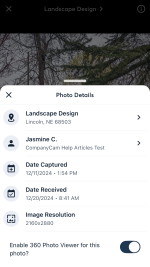
To enable this for a photo, tap the Info Icon in your Photo Viewer for an individual photo, then toggle on the 360 Photo Viewer. I'll share a screenshot of what that looks like.

Appreciate you walking through your workflow in such detail. Feedback like this is what gets ideas like this moving. 🙌

Attachments

  • IMG_1656.PNG
    IMG_1656.PNG
    460.8 KB · Views: 4
Upvote 0

DRAG/SLIDE TO SELCT PHOTOS FEATURE IOS

It would be awesome if you could slide to select photos when uploading from camera roll on IOS instead of choosing each individual photo. This is literally the only app I use that doesn’t have that feature and every time I go to select photos, I do it and then swipe out of it. I would think this would be an easy update 😉.

Other than that app is incrediae and love all the new updates!! Thanks for all you guys do.
  • Like
Reactions: Megan M.

Auto Generate Project Numbers

Is there any plans to have companycam auto generate project numbers?

This is incredibly helpful by using project numbers for POs, timecards, and Quickbooks. Right now we have to try and come up with a unique project name and if you have a client that you are doing multiple projects for under different workorders or contracts it can make it very confusing.
  • Like
Reactions: Megan M.

Customer Sync and Project Creation

Hey there!

Thanks for the feedback.

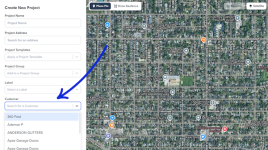
Are you using the CompanyCam Customer feature? If so, you can choose a Customer from the drop-down in the Project creation flow. I've included a screenshot below of what that looks like.

Untitled design (45).png

Customers are great for keeping every job tied to the right contact info without re-entering it project after project, and they work with our other sales features such as Boards, so you can see exactly where each customer's project sits in your pipeline. Read more here: https://help.companycam.com/en/articles/15327299-creating-and-managing-customers

As for your request regarding the QuickBooks Online integration: right now, new Customers, Sub-Customers, Estimates, and Invoices created in QuickBooks Online automatically create a matching Project in CompanyCam, and you can send photos from that Project back to QuickBooks Online, plus payments collected in CompanyCam sync over automatically. But creating a Customer or Project in CompanyCam first and having that push a new Customer record into QuickBooks Online isn't something we support today. I'll pass this along to our product team as a feature request.

Thanks again!
Upvote 0

Bulk Remove/Add Contributors with AI Assistant

I wanted to send in some feedback or request for adding a tool or way for the AI assistant to be able to remove and/or add contributors to jobs in bulk. We just fired a sub-contractor we have been working with for years and I am having to go into each individual job and manually remove them from every job and then create new link for each job to send to the new sub-contractor. This option would be very helpful for situations like this.
  • Like
Reactions: Megan M.

Sales: Invoicing and Proposals Non-Taxable Items

I would really like to move our current sales process over to CompanyCam by using the Sales Proposals. Without being able to add non-taxable items, I cannot adjust our current process. I thought once the Invoicing became available that this would change and while it is available for the Invoices and an option when adding items to the Price Book, I would like to see it become available in the Proposals.
  • Like
Reactions: Megan M.

Link Google Calendar Events to Existing Projects

Please add two-way Google Calendar syncing that matches calendar events to existing CompanyCam projects by CompanyCam project ID, project link, or address. Currently, calendar events create duplicate projects instead of updating or linking to the existing job. The integration should preserve one project record while syncing appointment dates, times, assigned users, and notes in both directions.

Customer Sync and Project Creation

A couple of suggestions:

1) Allow back-syncing to Quickbooks online when creating Customers and Projects. So, any customer created in CompanyCam's database creates in Quickbooks Online, and projects are created as Projects to that customer as well.
2) When creating a new project, have a dropdown to select the customer it's assigned to, and then auto-populate the contact info after it's created.

🔥 Hot topic: Prices for your work 🔥

One thing I’ve been thinking about with the “you’re not charging enough” conversation is how contractors actually know when a price is enough. Raising prices is one thing, but if you don’t know the fully loaded cost behind the job, it’s still possible to raise the price and have less margin than you think. And a quote that looks fine initially can change pretty quickly when materials run over, labour takes longer, or the customer asks for a discount.

I’ve been testing a simple free calculator around this — you enter the job costs and target margin, then stress-test the quote against things like discounts and cost overruns. Full disclosure: I’m involved in testing it. There’s no signup or payment. I’m mainly trying to see whether contractors actually find this useful before taking it any further.

Upvote 0

Pro tip: take a photo when you clock in

Next time you clock in on a project, snap a photo while you're at it.

It gets tagged with "clock in," stamped with the date and time, and dropped right onto your timesheet next to your hours. So instead of a row of numbers, you've got a visual record of the job. A few ways crews are already using it: a shot of the truck in the driveway to start the day, a quick crew photo when everyone shows up, or a photo of the finished area to clock out.

Takes one extra second and turns your timesheet into proof of the work.

You have early access to Time Tracking, no cost to you while we fine-tune things. We'll give you a heads-up before pricing kicks in.

How are you using the clock-in photo on your jobs? Drop a screenshot or tell us your routine below.
Timesheets GIF by obii.io

FEATURE REQUEST: Add regular collaborators so they can be added to several projects instead of only to one

Hey Maria!

Thanks for this one, it's a great call out. Right now, Collaborators are tied to individual projects, so there's no way to save a group of people and pull them into a new project without sending a fresh invite each time. If you're working with the same subs over and over, I can see how re-inviting them on every Project gets old.

We don't have a saved Collaborator list like you're describing just yet, but it's exactly the kind of thing our product team wants to see, so I've passed your request along to them.

Requests like this one genuinely help the team figure out what to build next, so thanks for taking the time to write it up. Keep 'em coming!
  • Like
Reactions: Maria Erazo
Upvote 1

Invoices - Item Quantities

I love the Invoice feature already. Here's my #1 request, though. Item quantities should allow decimal values, and allow less than one. Labor is the #1 line item we'd need it for, but for us as electricians, we'll bill partials for pulling lube, silicone, phase tape, etc.
Hey, Decimals are supported on mobile so if you need to send an invoice with decimals please use mobile. We will update web today to support decimals. Thank you for flagging this!
Upvote 0

Photo Editing While In Proposals

Hi there,

Thanks so much for taking the time to share this! That's a really valid pain point, and we completely understand why jumping back and forth between the project and Proposals to edit a photo feels tedious, especially when you're trying to get something out to a client quickly.

I've passed this along to our product team. While I don't have a timeline to share right now, feedback like yours is exactly what helps shape what we build next, so it's genuinely helpful to hear how this fits into your workflow.

If anything changes on this front, we'll be sure to update this thread. Thanks again for flagging it!
Upvote 0

Filter