Project Access from My Stuff

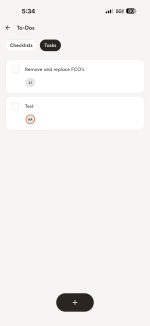
When I assign tasks to a normal user, when they pull up that task from My Stuff -> Tasks, they are able to get to the job to view the whole thing when they are using an iPad. However, on the phone app, they are only able to view the task and not the associated job. Can this be fixed so that we can pull up the job from the task view?

Attachments

  • IMG_2121.PNG
    IMG_2121.PNG
    118.1 KB · Views: 1
  • Like
Reactions: Megan M.

Global Document View of Signature Request/Status

We would like Documents Sent for Signature to be accessible directly from the left-hand toolbar. This would give our team one place to quickly view and track outstanding documents without having to navigate through individual projects.

We also like the new Home layout and would love to see the To-Do section become customizable based on how each company operates.

We do not use To-Dos within the platform because we manage all of our tasks through AccuLynx. Because of this, the To-Do section is essentially wasted space on our Home page. Giving companies the ability to customize this section would make the Home dashboard much more useful.

For our company, we would replace the To-Do section with Documents Sent for Signature.

Ideally, this section would give us a quick snapshot of documents and their current status:

• Awaiting Signature
• Signed

Having Documents Sent for Signature available both on the Home dashboard and from the left-hand toolbar would make it much easier for our team to monitor documents that still need attention.
  • Like
Reactions: Megan M.

White‑label proposal email branding

Right now, when we send proposals from CompanyCam, the email that goes to customers still shows CompanyCam branding and the CompanyCam logo. This makes it difficult to present proposals as fully coming from our own company.
We’d like the ability to fully white‑label the proposal email so it reflects our company branding instead of CompanyCam. This would make proposals feel more professional and consistent with our brand when customers receive them.
This is currently preventing us from using proposals the way we’d like in our workflow.
  • Like
Reactions: Megan M.

Edit Active Advanced Checklists on Projects

Now that the MCP gives us access to advanced checklists (but not classic checklists), we want to move over to advanced checklists so that we can make them via automations, and use their nice features.

However, we can't add Fields or Sections to existing checklists on projects. This was such a helpful feature of classic checklists, allowing us to build on the structure of a template while still being able to capture one-off items without needing to make a whole separate checklist.

It would be much easier if we could add Fields and Sections to active advanced checklists on projects without relying on the cumbersome workarounds of duplicating or deleting existing Fields/Sections on the checklist. We can't even do the duplicating/editing of active checklists through MCP, so it eats away from that automation value big time.

Has anyone found a better workaround for this issue?

Any idea when the one-off advanced checklists will be available to add to projects? And will those be able to derive from a template and be edited in the project on web/mobile apps and over MCP?
  • Like
Reactions: Megan M.

Field Scheduling

The biggest gap here is field scheduling. I have been with company cam forever and patiently waiting for a basic schedule to come out so the guys know where to go and when to go.

It's the biggest gap I have. As a renovations company I need a software like jobtread to schedule and budget projects, but their field use side is super weak, So I use company cam to manage all of my field staff, which works amazing, but I still have to formally send a "this is where you are going today" text to everyone. A simple calendar where you could asign the tasks or checklists to and assign the crew to would be super helpful, or even simpler, just a calendar where you can sign the crew to a date and a time and a project.
  • Like
Reactions: Megan M.

Allow Timelink Link to download original and modified photos

We do lots of surveys for our clients where the designers would like access to the original photos and the marked up ones with measurements, etc. Right now, the Timelink link only allows for downloading the "modified" photo. I would like to have the ability to download original photos also. The workaround is that I have to download "originals" and send them to my client. These projects progress over months, sometimes years, so I am often downloading "originals" for my clients as they need them.
  • Like
Reactions: Megan M.

Make Checklist Templates available to track on Groups > Overview > Checklist

Hello,

I am a Project Manager using Company Cam and have a checklist template I need to complete for each audit. It would be really helpful to be able to see the progress of that checklist from the Group Overview page. However, as I can see now, checklist templates do not show up on that page. Is this something that can be integrated there? Thank you!
  • Like
Reactions: Megan M.

GPS Coordinates in Address Bar

I have projects that are gps specific. I can not seem to add gps into the address bar when creating a project.
The work around to do this is quite clunky and is not a great work around as my locations are utility poles.
Also the address popup covers the positions and can not be moved out of the way unless I move the pin.
Using cross streets and nearby addresses is not always feasible as many poles are no where near cross streets or addresses.

Our crews would greatly appreciate a fix.

Trade Partner Record Per Project

I'd like the ability to record which companies worked on project - include company name, contact person, and contact info. Just like the 'Customer' field in a project, but for Trade Partners/Subcontractors.
This would be useful not only during the build for project managers to see who is on what job at a glance, but also after the build as we utilize Company Cam for our warranty department and they frequently need to reference which sub to contact.
Would like this to be standalone from Collaborators. We're currently using labels to see which sub is working on a project, but it's visually busy and hard to read quickly. Also can't put their contact info there.

Projects/Roles

Left field idea here, but being able to assign "roles" to a user on a project could be monumental for the Assistant automations. If you could assign "Project Manager/Estimator", "Superintendent", "Foreman", "Apprentice", or anything else, especially if we can make custom roles ourselves, we could ask the assistant to auto-update for particular things, like checklist completion, etc, but only to certain roles as needed.

Same Time Summary View for a User’s Own Hours

When viewing another user’s time, CompanyCam provides a summary-style view with total hours and other useful information.


However, when a user views their own time in My Time, that same summary view is not available. This is true even for users with Manager or full-access permissions.


It would be helpful if users could see the same summary information for their own time that they can see when viewing another user, including total hours for the selected period.


This would make it much easier for employees to quickly review their own hours and catch missing or incorrect entries.

Link to photos showing the issue: https://app.companycam.com/galleries/TcxDVwgh


Thanks,
Ben Pearson
Sledge Seattle LLC
206-290-1773
ben@sledgesea.com
  • Like
Reactions: Megan M.

Add a Job Status Field & Arrival Window (date/time field) to Projects

Adding a status field would be a lot easier than using labels, especially when you want to use the labels for other things. Also, a date and time field: I know you got the time tracking, but let's say you give a customer an arrival window. You should be able to set that in the project not just in the notepade/description.

Both of these would go far for CRM integrations and hooking that up, especially if, for example, we're using Salesforce with CompanyCam. Yes, I'm able to utilize labels, but it would just be a lot cleaner and less messy with boards if you had a status field for complete, incomplete, canceled, etc., along with a start date and time field. That way, you could set a date and time and utilize those two fields to talk back to your CRM.

When the tech in the field either routes his job for the arrival window or updates the status, you could have a webhook fire back to your CRM, updating that as well. You guys have so many awesome features, and these two simple ones are missing.
  • Like
Reactions: Megan M.

CompanyCam is now hurting my business -- We need FOLDERS

CompanyCam has been great. However, I now that I have thousands of photos spread across all our our properties and it's getting really tough to keep things organized. I need to be able to take Checklists and Reports and throw them in to FOLDERS. Doing 'keyword' searches was great when I had a small amount of data. But now even those results are unmanageable.

I love that CompanyCam has added new features over the years, but if Folders are not added soon, I'm going to have to look for a different software solution.
  • Like
Reactions: Megan M.

Filter