Link Google Calendar Events to Existing Projects

Hey! Thanks for sharing how you'd like the Google Calendar integration to work.

Right now, as you mentioned, the Google Calendar integration creates a new CompanyCam project for each synced event rather than matching to one you've already got open, so we hear you on the duplicate headache.

We've already shared your feedback to our integrations team. We can't promise a timeline, but if this becomes an available workflow, we'll be sure to check back with you here.

In the meantime, the current workaround is to create the Project in CompanyCam first, then use the "Send to Google Calendar" button on that project. That pushes a correctly-linked event out to your calendar without creating a duplicate on the way back in. I'll share a link to our Google Calendar integration help article that includes a step-by-step guide on how the integration works: https://help.companycam.com/en/articles/8510093-integrate-companycam-google-calendar

We'll keep this thread in mind as we shape the roadmap. Again, we really appreciate you taking the time to write it up!
Upvote 0

Map filtering by project labels on mobile

Hey Jeremy, thanks for flagging this!

It's totally fair that you'd want this feature in the mobile app so folks in the field have the same map filtering options. It's something our product team is looking into.

We've shared this feedback directly with the team, and we'll circle back here if there's any progress to share. We hear you, and it makes sense that it also lives where most of you actually are: in the truck, on the roof, wherever the job takes you.

Appreciate you taking the time to post. Feedback like this helps us prioritize what's next.
Upvote 0

Ability to Minimize Sidebar on Web App

Hey there! 👋 Thanks for sharing!

We've shared your feedback with our product team and they have been actively talking through options for giving folks more screen real estate on the web app. No firm timeline to share, but this is on their radar, and your post is helping keep it there, so thank you for taking the time to write it up! 🙌

Quick tip in the meantime: if you shrink your browser window a bit narrower, the sidebar will automatically collapse out of the way. It's not a permanent fix, and it might not work if you want to view more photos on the screen, but it's currently the only way to collapse the left navigation bar.

We'll keep this thread in mind as things develop!
Upvote 0

Photo-mode Lock capability

i am in the field a lot and keeping the phone app open, it is constantly 'accidentally' switchin from Photo mode to video mode or document scan mode. Which means I am constantly having to manually switch it back. I would like the ability to 'lock' the photo mode so that it can only take photos and not easily switch based on errant thumbs/putting the open app phone into my pocket while fumbling with a tape measure or pitch gauge.
  • Like
Reactions: Megan M.

Reports - active working window - increase editing window size - web app

I’d like to request an improvement to the Reports section regarding the active working window used for writing/editing documents.

Currently, the visible editing area is quite limited—often only enough to comfortably view a paragraph or small section at a time. This makes drafting, reviewing, and editing longer reports difficult because it is hard to see the surrounding content, understand page flow, or make revisions in context.

It would be extremely helpful if the workspace could function more like a traditional document editor, with the ability to:

  • View an entire page at once, or substantially more of the document.
  • Scroll naturally through the document while maintaining a larger editing area.
  • See preceding and following paragraphs while actively editing a section.
  • Review page layout, headings, spacing, and overall document flow.
  • Optionally expand the editor into a full-screen or dedicated document-editing mode.

For report writing in particular, editing only a small portion of the document at a time makes it difficult to evaluate continuity, formatting, and organization.

Ideally, the experience would feel closer to Word or Google Docs: the full document remains visible and navigable while the user edits directly within it.

A larger, page-oriented editing workspace would make the tool significantly more useful for professional report drafting and revision.

We are a structural engineering firm testing Company Cam's reporting capabilities. If you improve the interface, we are all in on Company Cam for issuing reports. Thanks!
  • Like
Reactions: Megan M.

360 Camera Support

Hey there! 👋 Thanks for sharing your feedback!

Here's where things stand today: CompanyCam doesn't have native Bluetooth pairing for 360 cameras like the Insta360, and drawing-set/floor-plan pin mapping for a full 360 walkthrough tour isn't available either. So you're not missing a hidden setting, but we've logged both with our product team as ideas we're aware of. I can't promise development or a timeline, but feedback like this (with a clear use case) helps us prioritize. Thanks for laying out the full workflow!

I'd also recommend keeping an eye on our News Center for product releases: https://intercom.news/companycam

That said, there's good news: depending on your plan, you can upload your Insta360 photos to a CompanyCam project, and our 360 Photo Viewer will display them correctly (no stretching/distortion), so your team can view and interact with them right from the web app.

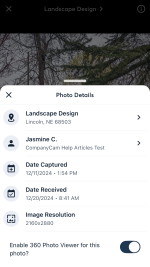
To enable this for a photo, tap the Info Icon in your Photo Viewer for an individual photo, then toggle on the 360 Photo Viewer. I'll share a screenshot of what that looks like.

Appreciate you walking through your workflow in such detail. Feedback like this is what gets ideas like this moving. 🙌

Attachments

  • IMG_1656.PNG
    IMG_1656.PNG
    460.8 KB · Views: 4
Upvote 0

DRAG/SLIDE TO SELCT PHOTOS FEATURE IOS

It would be awesome if you could slide to select photos when uploading from camera roll on IOS instead of choosing each individual photo. This is literally the only app I use that doesn’t have that feature and every time I go to select photos, I do it and then swipe out of it. I would think this would be an easy update 😉.

Other than that app is incrediae and love all the new updates!! Thanks for all you guys do.
  • Like
Reactions: Megan M.

Auto Generate Project Numbers

Is there any plans to have companycam auto generate project numbers?

This is incredibly helpful by using project numbers for POs, timecards, and Quickbooks. Right now we have to try and come up with a unique project name and if you have a client that you are doing multiple projects for under different workorders or contracts it can make it very confusing.
  • Like
Reactions: Megan M.

Customer Sync and Project Creation

Hey there!

Thanks for the feedback.

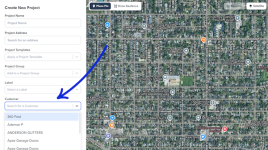
Are you using the CompanyCam Customer feature? If so, you can choose a Customer from the drop-down in the Project creation flow. I've included a screenshot below of what that looks like.

Untitled design (45).png

Customers are great for keeping every job tied to the right contact info without re-entering it project after project, and they work with our other sales features such as Boards, so you can see exactly where each customer's project sits in your pipeline. Read more here: https://help.companycam.com/en/articles/15327299-creating-and-managing-customers

As for your request regarding the QuickBooks Online integration: right now, new Customers, Sub-Customers, Estimates, and Invoices created in QuickBooks Online automatically create a matching Project in CompanyCam, and you can send photos from that Project back to QuickBooks Online, plus payments collected in CompanyCam sync over automatically. But creating a Customer or Project in CompanyCam first and having that push a new Customer record into QuickBooks Online isn't something we support today. I'll pass this along to our product team as a feature request.

Thanks again!
Upvote 0

Bulk Remove/Add Contributors with AI Assistant

I wanted to send in some feedback or request for adding a tool or way for the AI assistant to be able to remove and/or add contributors to jobs in bulk. We just fired a sub-contractor we have been working with for years and I am having to go into each individual job and manually remove them from every job and then create new link for each job to send to the new sub-contractor. This option would be very helpful for situations like this.
  • Like
Reactions: Megan M.

Sales: Invoicing and Proposals Non-Taxable Items

I would really like to move our current sales process over to CompanyCam by using the Sales Proposals. Without being able to add non-taxable items, I cannot adjust our current process. I thought once the Invoicing became available that this would change and while it is available for the Invoices and an option when adding items to the Price Book, I would like to see it become available in the Proposals.
  • Like
Reactions: Megan M.

Link Google Calendar Events to Existing Projects

Please add two-way Google Calendar syncing that matches calendar events to existing CompanyCam projects by CompanyCam project ID, project link, or address. Currently, calendar events create duplicate projects instead of updating or linking to the existing job. The integration should preserve one project record while syncing appointment dates, times, assigned users, and notes in both directions.

Customer Sync and Project Creation

A couple of suggestions:

1) Allow back-syncing to Quickbooks online when creating Customers and Projects. So, any customer created in CompanyCam's database creates in Quickbooks Online, and projects are created as Projects to that customer as well.
2) When creating a new project, have a dropdown to select the customer it's assigned to, and then auto-populate the contact info after it's created.

🔥 Hot topic: Prices for your work 🔥

One thing I’ve been thinking about with the “you’re not charging enough” conversation is how contractors actually know when a price is enough. Raising prices is one thing, but if you don’t know the fully loaded cost behind the job, it’s still possible to raise the price and have less margin than you think. And a quote that looks fine initially can change pretty quickly when materials run over, labour takes longer, or the customer asks for a discount.

I’ve been testing a simple free calculator around this — you enter the job costs and target margin, then stress-test the quote against things like discounts and cost overruns. Full disclosure: I’m involved in testing it. There’s no signup or payment. I’m mainly trying to see whether contractors actually find this useful before taking it any further.

Upvote 0

Filter