Moving Folders

Hey Koren!

Thanks for bringing this over here after our chat today. I've already tagged you on the feature requests for both moving Documents/Folders between Projects and bulk deleting Documents. So if either of those ships, you'll hear about it.

Straight answer on the Folder question: Folders live inside a single Project right now, so there's no way to pick one up and drop it into another Project. Same story for the PDFs inside it. Not the answer you wanted, and I'm not going to pretend the download-and-reupload route is fun.

A couple things that should actually save you time, though:

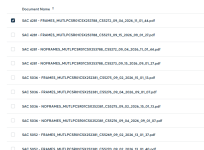
Bulk moves just got way better. As of last week you can hover any Document row, click the checkbox, and a bar pops up with a running count and a Move to Folder button. Best part — your selections stick while you search, so you can grab a few, search for more, keep adding to the same batch, and move them all in one shot. There's no true "select all" button yet, but that's actively being worked on along with a few other bulk actions. 🙌

And nice catch on the delete workaround. 👏 Dropping everything into a Folder and deleting the Folder really is the fastest way to clear a batch today — you found the shortcut!

For those PDFs in the wrong Project: download them from the Documents tab, then upload them back into the correct Project. Still a haul, but it's a one-time cleanup.

Keep the feedback coming and thanks for sticking with us on it.

Upvote 0

RETROACTIVE GOOGLE DRIVE SYNCE REQUEST

Hey Sharee! 👋 Great question!

Right now the Google Drive integration is forward-looking only. Once you connect it, CompanyCam creates that root folder in your Drive and starts syncing new Projects and new photos from that point on. There isn't a retroactive/historical sync today, so older Projects from before you connected won't backfill on their own.

Here's the closest workaround in the meantime: you can pull older Projects down and drop them into your CompanyCam Drive folder manually. Open a Project → 3-dot menu in the top right → Download All Photos, enter your email, and you'll get a zip you can unzip straight into the matching folder in Drive. Full steps are here. Two tips that make it less painful: if you Tag your photos before downloading, you can choose for the photos to be named by their Tag instead of a random string, and big downloads now arrive in batches so you're not waiting on one giant export.

And yes, a historical sync option is absolutely on our radar — you're not the only one asking. I'll add your feedback to the request.

Thanks for taking the time to write this up! 🙌
Upvote 0

Edit Active Advanced Checklists on Projects

Now that the MCP gives us access to advanced checklists (but not classic checklists), we want to move over to advanced checklists so that we can make them via automations, and use their nice features.

However, we can't add Fields or Sections to existing checklists on projects. This was such a helpful feature of classic checklists, allowing us to build on the structure of a template while still being able to capture one-off items without needing to make a whole separate checklist.

It would be much easier if we could add Fields and Sections to active advanced checklists on projects without relying on the cumbersome workarounds of duplicating or deleting existing Fields/Sections on the checklist. We can't even do the duplicating/editing of active checklists through MCP, so it eats away from that automation value big time.

Has anyone found a better workaround for this issue?

Any idea when the one-off advanced checklists will be available to add to projects? And will those be able to derive from a template and be edited in the project on web/mobile apps and over MCP?
  • Like
Reactions: Megan M.

GPS Coordinates in Address Bar

Hi Shayla,

This doesn't work.
It doesn't populate the job on the map.
Also when I click on the coordinates in the project is just pulls up a general Google Map that is near my location and no where near the actual project location.

Guys use the map in the field to bring up jobs they are near and get the correct job number to put their time to - photos to.

Example, the location I used has 2 other projects for two different clients that are all working on the same project but different phases. The correct photos need to go to the correct clients. If the project doesn't populate, the final as builts/photos, billing will all be off.
  • Like
Reactions: Shayla C.
Upvote 0

Task Timestamps

Hey there! Thanks for you feedback!

Right now, Project Tasks don't stamp who created them or when. What is tracked today is the other half of the story: when someone checks a task off, we capture who completed it and when.

A couple of things that get you close in the meantime:
  • Assign the task right when you create it. The assignee gets a notification, and it shows up in their My Stuff so there's a clear owner from the jump — often that's the accountability people are actually after. Here's how.
  • Use the task details field for context. We just raised the limit to 5,000 characters, so there's plenty of room if your team wants to keep noting initials for now — and it beats cramming it into the title.
None of that is the automatic timestamp you're asking for, I know. But this request is logged with our product team and tied to the same feedback we've heard from other crews.

Thank you for taking the time to post this! 🛠️
Upvote 0

Trade Partner Record Per Project

Hey! Thanks for laying this out so clearly. The distinction between "who's on the job" and "who has access to the project" is a good one, and I can see why Labels feel clunky for this.

Right now there isn't a dedicated Trade Partner/Subcontractor field like the Customer field, so this isn't something you can do today. But this is genuinely useful feedback, especially the warranty use case; that's a workflow angle that's easy to miss if you're just thinking about active builds.

In the meantime, a couple of workarounds that might help:
  • Project Description: drop the sub's company name, contact, and number right in there. It's plain text, so it won't be as scannable as a dedicated field, but it keeps the info attached to the project without cluttering up Labels.
  • A Document on the project: if you want something more structured (multiple subs, multiple trades), a running Document with a simple table works well and stays visible to anyone with project access, including your warranty team down the line.
I'm passing this along to the product team. Feel free to add any other details here (like whether you'd want this per-project or a main director) since that kind of detail helps shape the design if it gets picked up. 🙌
Upvote 0

GPS Coordinates in Address Bar

Thanks for the extra detail, that helps a lot.

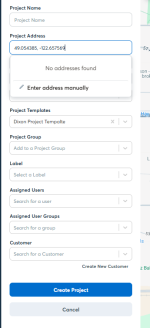
Since you're working from coordinates with no address to search for, skip the address search bar entirely. When you're creating the project, click Enter address manually below No addresses found. That opens a plain text address form with no autocomplete fighting you, so you can paste the coordinates straight in as the address and save. No pin-dragging, and you don't have to leave CompanyCam to find an address close to the GPS coordinates you're trying to work with.

Give that a shot and let us know if it gets you where you need to be!
Upvote 0

Projects/Roles

Hey! Not a left-field idea at all, you're onto something we're actively digging into. We hear you on wanting more flexibility than our current four roles give you, especially for keeping Assistant automations pointed at the right people. Can't share a timeline yet, but this is being worked on, and posts like yours help us prioritize what to build first. Keep it coming! 🙌
Upvote 0

GPS Coordinates in Address Bar

Hi!

Thank you for getting back to me.
I think that perhaps I did not clearly explain.
Often, we receive the GPS coordinates sans address. When I drop them into the address bar, I get a pop up that says address not found.
I then have to leave CompanyCam and go directly into google maps to drop in the coordinates to bring up nearby addresses and then can go back into CompanyCam and put the nearby location in. Then I have to fiddle around with the pin to get it as close to the GPS I have been provided. (which is why that pop up is so annoying as I have to move it aside multiple times just to see the pole I'm trying to mark).
We do not typically create jobs in the field, it is all done in office.
I don't feel I should have to leave CompanyCam to get GPS location added. It's clunky.
1789493608333.png
Upvote 0

GPS Coordinates in Address Bar

Hey Koren! Good news, this one's already live. 🙂

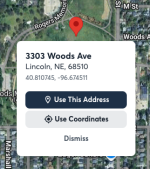
You can drop a pin right on the utility pole and skip the address search entirely. If we can't resolve the pin to a real street address, we'll offer you the GPS coordinates as the address instead, and this also works now even on projects that already have an address, if you'd rather swap it for coordinates. No more hunting for cross streets that don't exist.

Here's the full walkthrough: Creating a Project without a Street Address

On the pop-up covering the pin position, that one's not on our radar yet, so thank you for calling it out. If it's still giving you trouble, a screenshot or two of exactly where it's blocking your view would help the team a ton.

1789492365024.png
Upvote 0

Trade Partner Record Per Project

I'd like the ability to record which companies worked on project - include company name, contact person, and contact info. Just like the 'Customer' field in a project, but for Trade Partners/Subcontractors.
This would be useful not only during the build for project managers to see who is on what job at a glance, but also after the build as we utilize Company Cam for our warranty department and they frequently need to reference which sub to contact.
Would like this to be standalone from Collaborators. We're currently using labels to see which sub is working on a project, but it's visually busy and hard to read quickly. Also can't put their contact info there.

Saving a .cvj file to projects

Hey there, thanks for sharing what would make your work easier within CompanyCam! 🙌

Straight answer first: .cvj files aren't supported in Project Files just yet. Today the Documents tab accepts PDF, DOC, DOCX, XLS, XLSX, CSV, TXT, JPG, JPEG, PNG, and NUMBERS, up to 100 MB each.

Good news though — we do have a feature request logged for this exact ask, specifically calling out Cabinet Vision .cvj files. It's on our Product team's radar and I've added this thread to it. I can't promise anything, but your request is being tracked!

If anyone else in the cabinetry/millwork world is running into this same thing or recommends a workaround, feel free to chime in. 👇
Upvote 0

Same Time Summary View for a User’s Own Hours

Hey, Ben! This is a great catch, and honestly a fair one. 👏

You're right that the summary view with total hours shows up when you're looking at someone else's time, but not when you're looking at your own in My Time. That's an inconsistency, not a permissions thing, and it makes scanning your own week harder than it should be.

Good news: our Time Tracking team has this one on their radar and is actively working on bringing that same range selector and hours total over to My Time, for every role. No date to promise yet, but it's in motion!

In the meantime, the best workaround is the Time Tracking page on web. You can filter down to a date range there and see totals, plus export to CSV if you want to double-check a pay period. It's a couple of extra taps compared to just glancing at your phone, but it'll get you the same numbers until the mobile view catches up. More details here.

Thanks for taking the time to write this up so clearly — keep it coming.
Upvote 0

Quickbooks integration

Hey there!

You're not alone on this one — quoting in CompanyCam first and only touching QuickBooks once the job is signed is a super common workflow, and right now the integration runs QBO-first, so you end up with that duplicate Project and a need to merge.

I'm sharing your feedback with our product team. No date to share yet, but it's on our radar as we continue to improve the QuickBooks Online integration.

Appreciate you writing this up! 🙌
Upvote 0

Filter